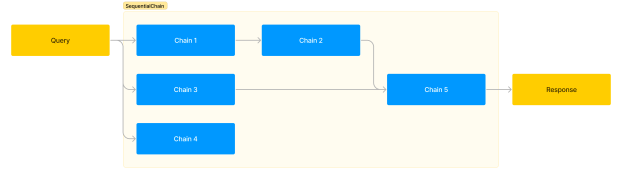
앞서 살펴본 SimpleSequentialChain은 작은 Chain들이 한 줄로 연결된 형태였습니다.

SequentialChain은 아래와 같이 작은 Chain들을 좀 더 복잡한 형태로 연결할 수 있는 Chain입니다.

Example
예제를 살펴보겠습니다. 간단하게 만들 수도 있지만 예시를 위해 조금 복잡하게 만들었습니다. 외국어로 된 사용자 리뷰를 받아서 한글로 번역하고, 번역한 내용을 한 문장으로 요약한 다음 요약을 보고 답변을 달려고 합니다. 답변 언어는 원래 리뷰의 언어로 하고, 추가로 감정 분석을 통해 긍정/부정 점수를 매기려고 합니다. 각각의 작업에 대한 Chain들을 다음과 같이 만들어 연결하겠습니다.
- Chain 1: 외국어 리뷰를 한글로 번역, input = review, output = translation
- Chain 2: 한글 리뷰를 한 문장으로 요약, input = translation, output = summary
- Chain 3: 리뷰를 읽고 감정 분석 점수 매기기, input = translation, output = sentiment_score
- Chain 4: 리뷰의 언어 알아내기, input = review, output = language
- Chain 5: 리뷰의 한글 요약에 대해 원래 언어로 답변 작성, input = language & summary, output = reply
LLM
코드를 봅시다. 먼저 필요한 모듈을 import하고, 공통으로 사용할 llm 변수를 생성했습니다.
from langchain.chat_models import ChatOpenAI
from langchain.prompts import PromptTemplate
from langchain.chains import LLMChain

llm = ChatOpenAI(temperature=0.5)
PromptTemplate, LLMChain
다음에는 위의 Chain 1~5에 해당하는 PromptTemplate과 LLMChain을 만들겠습니다.
prompt1 = PromptTemplate(
    input_variables=['review'],
    template="다음 사용자 리뷰를 한글로 번역하세요.\n\n{review}"
)
chain1 = LLMChain(llm=llm, prompt=prompt1, output_key="translation")

prompt2 = PromptTemplate.from_template(
    "다음 리뷰를 한 문장으로 요약하세요.\n\n{translation}"
)
chain2 = LLMChain(llm=llm, prompt=prompt2, output_key="summary")

prompt3 = PromptTemplate.from_template(
    "다음 리뷰를 읽고 0점부터 10점 사이에서 부정/긍정 점수를 매기세요. 숫자만 대답하세요.\n\n{translation}"
)
chain3 = LLMChain(llm=llm, prompt=prompt3, output_key="sentiment_score")

prompt4 = PromptTemplate.from_template(
    "다음 리뷰에 사용된 언어가 무엇인가요? 언어 이름만 답하세요.\n\n{review}"
)
chain4 = LLMChain(llm=llm, prompt=prompt4, output_key="language")

prompt5 = PromptTemplate.from_template(
    "다음 리뷰 요약에 대해 공손한 답변을 작성하세요.\n답변 언어:{language}\n리뷰 요약:{summary}"
)
chain5 = LLMChain(llm=llm, prompt=prompt5, output_key="reply")
PromptTemplate을 만들 때 from_template을 사용한 것도 있고 사용하지 않은 것도 있는데, 연습을 위해 섞어서 사용한 것입니다. 하나로 통일해도 괜찮습니다. LLMChain을 만들면서 output_key를 사용했습니다. 이어지는 Chain들의 PromptTemplate에서는 output_key에 지정한 변수들을 사용한 것을 볼 수 있습니다. 이렇게 앞 Chain의 출력을 다음 Chain의 입력으로 지정할 수 있습니다. 이제 이 Chain들을 연결하겠습니다.
SequentialChain
from langchain.chains import SequentialChain

all_chain = SequentialChain(
    chains=[chain1, chain2, chain3, chain4, chain5],
    input_variables=['review'],
    output_variables=['translation','summary','sentiment_score','language','reply'],
)
review를 입력하고 결과가 어떻게 나오는지 봅시다.
review="""
I'm somewhat satisfied with this product.
Considering its cost-effectiveness, it's not bad.
However, regardless of the product itself,
the shipping took too long, which was disappointing.
"""
all_chain(review)

### 결과
{'review': "\nI'm somewhat satisfied with this product.\nConsidering its cost-effectiveness, it's not bad.\nHowever, regardless of the product itself,\nthe shipping took too long, which was disappointing.\n",
 'translation': '이 제품에 대해는 어느 정도 만족한 편입니다.\n비용 대비로 생각해보면 그렇게 나쁘지 않아요.\n하지만 제품 자체와는 상관없이,\n배송이 너무 오래 걸려서 실망스러웠습니다.',
 'summary': '제품은 만족스럽지만 배송이 너무 오래 걸려 실망스러웠습니다.',
 'sentiment_score': '7',
 'language': '영어',
'reply': 'Thank you for your feedback. We are glad to hear that you are satisfied with the product. We apologize for the disappointment caused by the delayed delivery. We will definitely take your feedback into consideration and work towards improving our shipping process. Thank you for bringing this to our attention.'}input_variables와 output_variables에 지정한 key들이 포함된 딕셔너리가 반환되었습니다. 각각의 key에 해당하는 value들이 prompt에 따라 원하는 결과로 나온 것을 볼 수 있습니다. 이렇게 SequentialChain을 사용하면 여러 Chain들을 다양한 방식으로 연결해 사용할 수 있습니다.
 PKGPL
PKGPL 
SequentialChain의 Documentation에는 Output_Variables이 존재하지 않는데 어떻게 사용하신건가요?
안녕하세요^^ 위 글은 1년 전에 작성한 글로, LangChain 0.0.29~0.0.3 정도의 버전을 사용해 작성한 글입니다. 글 작성 이후에 0.1 버전이 나왔고, 현재는 0.3.1까지 나왔는데, 그동안 API가 상당히 많이 바뀌었습니다. 개인적으로는 더이상 LangChain은 안 쓰고 그냥 OpenAI API를 사용합니다.
답변 주셔서 감사합니다! 저희도 몇일간 실험해본 결과 OpenAI API를 Direct하게 쓰는게 나을 것 같다는 결론이 나왔네요~